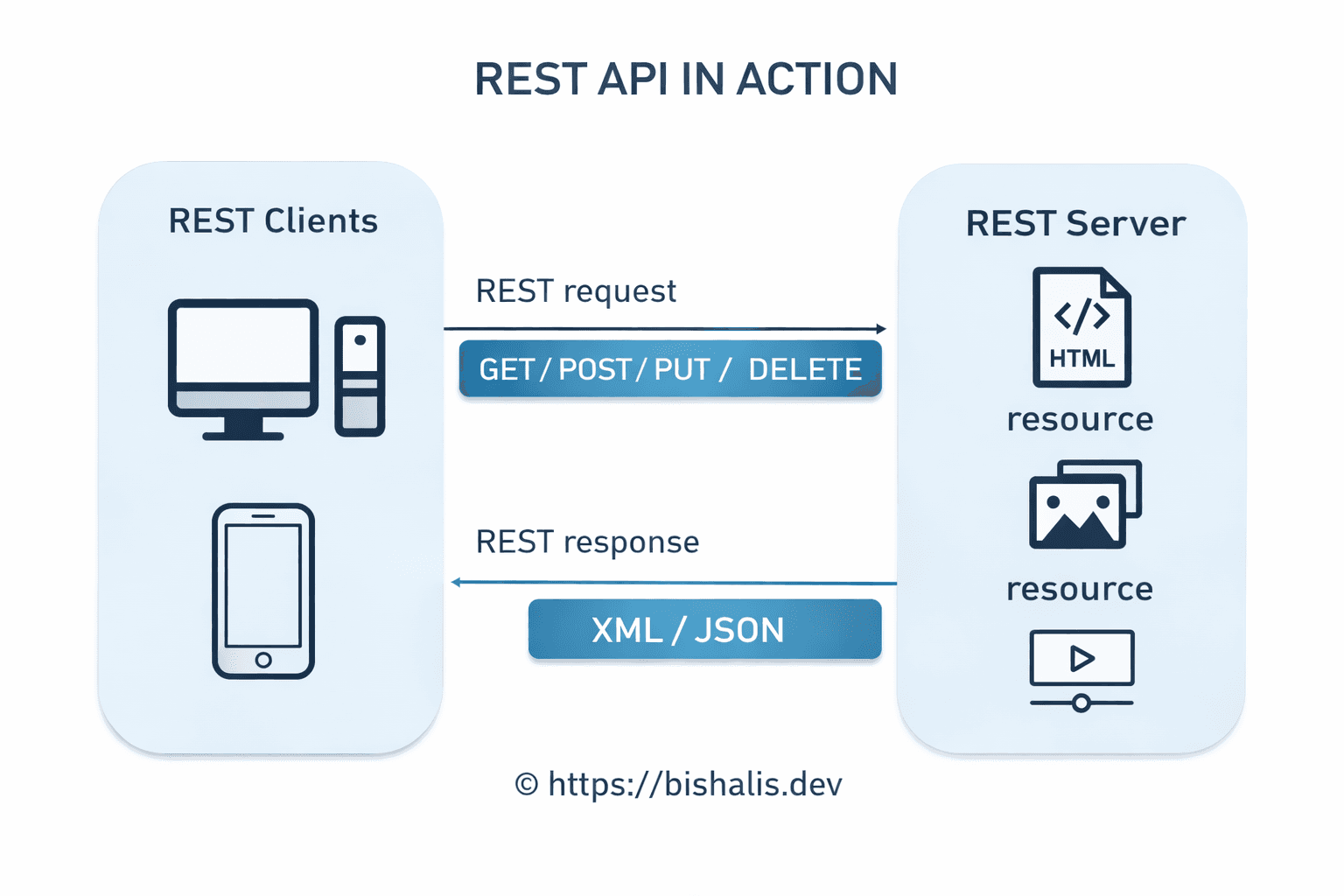
The best APIs feel inevitable. You land on the docs, glance at the endpoints, and within minutes you know exactly how to get what you need. No guessing, no digging through inconsistent responses, no decoding error messages that say success when they mean failure. It just makes sense—and that doesn't happen by accident.
Most of the time, what we ship is the opposite: something that runs in production and passes tests, but leaves the next developer (or the next team, or future you) squinting at the screen wondering why one route returns a list and another returns a single object, why errors come back as 200, and why the only way to get anything done is to cross-reference three different docs and a Postman collection. That gap—between "it works" and "it's a joy to use"—is where design comes in.
REST has become the default way we expose and consume web services—and for good reason. It’s simple, it scales, and it plays nicely with the web we already have. But “RESTful” can mean anything from “we use JSON and HTTP” to “we actually thought about how humans and machines will use this.” The gap between those two is where great APIs live.
Here are 10 principles that will move your APIs from “it works” to “people enjoy using it.”
1. Resources Are Nouns, Not Verbs
The first thing that separates a messy API from a clean one is how you name things. In REST, the resource is the thing—the user, the order, the book. The action is what you do to it, and that’s already encoded in the HTTP method. So the URL should describe what you’re talking about, not what you’re doing to it.
Avoid: GET /getAllUsers or POST /createNewOrder
Prefer: GET /users and POST /orders
If you’re building something like a library system, that might look like:
GET /books— list booksGET /books/123— one bookDELETE /books/123— remove that book
Once someone sees /books, they can reasonably guess that /books/123 exists. That predictability is what makes an API feel designed instead of accidental.
2. Let HTTP Methods Do the Talking
GET, POST, PUT, PATCH, and DELETE aren’t just conventions—they carry meaning. Caches, proxies, and clients rely on that meaning. If you use them correctly, the rest of the web stack behaves the way people expect.
- GET — Read data. Safe and idempotent. No side effects.
- POST — Create something new. Not safe, not idempotent.
- PUT — Replace a resource (or create it if it doesn’t exist). Idempotent: same request twice = same result.
- PATCH — Update part of a resource. Great when you only want to change one field.
- DELETE — Remove a resource.
For example, updating a user’s email:
PATCH /users/45
Content-Type: application/json

{
  "email": "newemail@example.com"
}
With PUT you’d typically send the whole user object; with PATCH you send only what changed. That keeps requests small and intent clear.
3. Use Real HTTP Status Codes
Status codes are the API’s way of saying “here’s what happened” before the client even parses the body. If you always return 200 and put the real outcome in JSON, every client has to open the body and branch on your custom logic. That’s exhausting and breaks the contract of the web.
Return the right code:
- 200 OK — Success, here’s the body.
- 201 Created — Something was created (e.g. after POST). Optionally send the new resource in the body.
- 204 No Content — Success, nothing to return (common for DELETE).
- 400 Bad Request — Invalid input or malformed request.
- 401 Unauthorized — Not authenticated (e.g. missing or invalid token).
- 403 Forbidden — Authenticated but not allowed to do this.
- 404 Not Found — Resource doesn’t exist.
- 500 Internal Server Error — Server broke; not the client’s fault.
When a mobile app gets a 401, it can send the user to login. When it gets 200 with "error": "unauthorized" in the body, you force every client to implement custom error handling. Status codes exist so you don’t have to.
4. Nest Resources—But Not Too Deep
Relationships between resources often show up in the URL. That’s fine and can be very readable: “Give me the books for this author” → GET /authors/12/books.
The problem is going overboard. Paths like /authors/1/books/5/chapters/2/paragraphs are hard to read, hard to maintain, and easy to get wrong. Keep nesting to one or two levels. If you need to go deeper, consider a flatter design with query params: GET /paragraphs?chapter_id=2.
For something like comments on a post, this is enough:
GET /posts/552/comments
Simple, clear, and you can still add filtering or pagination on top.
5. Filter, Sort, and Paginate
Never dump an entire table over the wire. It’s bad for performance, bad for the client, and bad for the network. Support at least:
- Filtering — e.g.
GET /products?category=electronics - Sorting — e.g.
GET /products?sort=price_descorsort=-created_at - Pagination — e.g.
GET /users?page=2&per_page=20orlimitandoffset
A solid request might look like:
GET /orders?status=shipped&sort=-created_at&page=1&limit=50
That way clients can ask for exactly what they need, and you avoid the “return everything and filter on the client” anti-pattern.
6. Version from Day One
Your API will change. Requirements will change. If you don’t version, “breaking change” means “break every existing client.”
Two common approaches:
- URI versioning — e.g.
/v1/users,/v2/users. Visible in logs and easy to try in a browser. - Header versioning — e.g.
Accept: application/vnd.myapi.v1+json. Keeps URLs clean but is less visible.
Most teams use URI versioning because it’s obvious and debuggable. Start with /v1/ from the first release so you never have to retrofit versioning later.
7. Keep It Stateless
The “S” in REST is stateless. The server shouldn’t need to remember who you are between requests. Each request should carry everything needed to understand and process it—auth, identifiers, and so on.
That might sound limiting, but it’s what makes horizontal scaling straightforward. Any server in the cluster can handle any request; you’re not tied to “sticky” sessions or server-side session stores. Use something like JWTs or API keys in the Authorization header so every request is self-contained.
8. Errors Should Be Useful and Consistent
When something goes wrong, the response should help the developer fix it. A good error payload is consistent and machine-readable, with a code, a message, and optional context (e.g. a link to docs).
Example:
{
  "error": {
    "code": "INVALID_EMAIL",
    "message": "The email address provided is not in a valid format.",
    "doc_url": "https://api.docs.com/errors/invalid-email"
  }
}
A few rules: don’t leak stack traces or internal details to the client. Do use a stable set of error codes so clients can branch on them. And do write messages that a human can actually use to debug.
9. Consistent Response Structure
Nobody gets excited about "response envelopes" in a design doc—but inconsistent response shapes are one of the biggest sources of bugs and frustration in real integrations. When one endpoint returns the resource directly, another returns it wrapped in a data key, and a third returns a list sometimes and a single object other times, every client has to write defensive, branchy code. That code is brittle, hard to test, and easy to get wrong.
The principle: Pick a single structure for success responses and use it everywhere. Same for errors (you already did that in the error-handling section). The client should be able to parse the response without checking "which endpoint is this again?"
Single resource
Always wrap the payload in a predictable key (e.g. data) so the client always knows where the actual content lives:
{
  "data": {
    "id": 123,
    "name": "Acme Corp",
    "email": "contact@acme.com",
    "createdAt": "2026-01-15T10:30:00Z"
  }
}
List of resources
Use the same envelope. The list lives under data; metadata like total count or pagination can sit alongside it:
{
  "data": [
    { "id": 1, "name": "First item" },
    { "id": 2, "name": "Second item" }
  ],
  "meta": {
    "total": 42,
    "page": 1,
    "perPage": 20
  }
}
Empty list vs. not found
Be consistent here too. Empty list is still a 200 with data: []; "no such resource" is 404. Don't return 200 with data: null for a missing resource—use 404. That way the client can do one thing: "if 200, use response.data; if 404, show 'not found'."
What not to do (and what to do instead)
1. Inconsistent wrapping of response data
Bad: Some endpoints wrap the resource under a specific key (user, product), others return the resource at the top level. The client has to write different unwrapping logic per endpoint.
// GET /users/1 — wrapped under "user"
{
  "user": {
    "id": 1,
    "name": "Alice Wonderland",
    "email": "alice@example.com"
  }
}

// GET /products/5 — raw at top level
{
  "id": 5,
  "name": "Widget X",
  "price": 29.99,
  "currency": "USD"
}
Good: Always use the same top-level key (e.g. data) for the primary resource. One parser works for every endpoint.
// GET /users/1
{
  "data": {
    "id": 1,
    "name": "Alice Wonderland",
    "email": "alice@example.com"
  }
}

// GET /products/5
{
  "data": {
    "id": 5,
    "name": "Widget X",
    "price": 29.99,
    "currency": "USD"
  }
}
2. List vs. single object by endpoint
Bad: The list endpoint returns a bare array; the single-resource endpoint returns a bare object. The client has to branch on "is this an array or an object?" before using the response.
// GET /users — raw array
[
  { "id": 1, "name": "Alice" },
  { "id": 2, "name": "Bob" }
]

// GET /users/1 — raw object
{
  "id": 1,
  "name": "Alice",
  "email": "alice@example.com"
}
Good: Both use the same envelope. data is an array for collections and a single object for one resource. The client always reads response.data.
// GET /users
{
  "data": [
    { "id": 1, "name": "Alice", "email": "alice@example.com" },
    { "id": 2, "name": "Bob", "email": "bob@example.com" }
  ]
}

// GET /users/1
{
  "data": {
    "id": 1,
    "name": "Alice",
    "email": "alice@example.com"
  }
}
3. Mixed metadata placement
Bad: Pagination and other metadata appear under meta on one endpoint, pagination on another, and at the root on a third. Clients have to check multiple places.
// GET /articles?page=1 — metadata in "meta"
{
  "data": [ /* articles */ ],
  "meta": { "currentPage": 1, "totalPages": 10, "totalItems": 100 }
}

// GET /comments?limit=20 — metadata in "pagination"
{
  "data": [ /* comments */ ],
  "pagination": { "limit": 20, "offset": 0, "next": "/comments?limit=20&offset=20" }
}

// GET /users?page=1 — metadata at root
{
  "data": [ /* users */ ],
  "currentPage": 1,
  "perPage": 20,
  "total": 500
}
Good: Use one key (e.g. meta) for all metadata. Same shape everywhere.
// GET /articles?page=1
{
  "data": [ /* articles */ ],
  "meta": { "currentPage": 1, "totalPages": 10, "totalItems": 100 }
}

// GET /comments?page=1
{
  "data": [ /* comments */ ],
  "meta": { "currentPage": 1, "perPage": 20, "totalItems": 150, "links": { "next": "/comments?page=2" } }
}

// GET /users?page=1
{
  "data": [ /* users */ ],
  "meta": { "currentPage": 1, "perPage": 20, "totalItems": 500 }
}
Once you standardize on a response structure, clients can rely on it. They build one parser, one set of types, and one mental model. That's the kind of "boring" design that actually makes an API a joy to use.
10. HTTPS, Auth, and Rate Limits
An API is an open door to your data. Treat it that way.
- HTTPS only — No plain HTTP. Everything in transit should be encrypted.
- Authentication — Use something standard: OAuth2 or API keys. Put tokens in headers, not in URLs.
- Rate limiting — Protect yourself from abuse and runaway clients. Return 429 Too Many Requests when limits are hit, and communicate limits in headers when possible.
- Input validation — Never trust the client. Validate and sanitize everything. This isn’t just about SQL injection or XSS—it’s about not letting bad data corrupt your system.
A Quick Reference
| Concern | Good default |
|---|---|
| URL shape | /v1/resources/{id} |
| Data format | JSON |
| Auth | Bearer token (e.g. JWT) |
| Naming | Pick camelCase or snake_case and stick to it |
| Docs | OpenAPI / Swagger |
Wrap-Up
A great API doesn’t happen by accident. It’s predictable, consistent, and honest with status codes and errors. It scales because it’s stateless and versioned, and it’s safe because you thought about auth, HTTPS, and rate limits from the start.
The best mindset: build for the developer (or the future you) who has to use this in six months at 2 a.m. When they land on your docs and your endpoints, they should feel like the API was designed with them in mind—not just “it works.”
That’s the difference between a backend that does its job and one that actually makes life easier for everyone who touches it.